📑 Table of Contents
- 1. Why Supermarkets Need Electronic Shelf Labels
- 2. ESL Size Guide for Supermarket Departments
- 3. Battery Life: What to Expect and How to Plan
- 4. Gateway Planning: Coverage, Capacity, and Placement
- 5. Wireless Protocol: BLE vs. Zigbee vs. Sub-GHz
- 6. Total Cost Breakdown for Supermarket Deployment
- 7. 10-Step Supermarket ESL Deployment Checklist
- 8. POS/ERP Integration: Making Price Updates Work
- 9. Freezer, Cold Chain, and Specialty Environment ESL
- 10. Top 5 ESL Deployment Mistakes to Avoid
- 11. FAQ: ESL for Supermarket
1. Why Supermarkets Need Electronic Shelf Labels
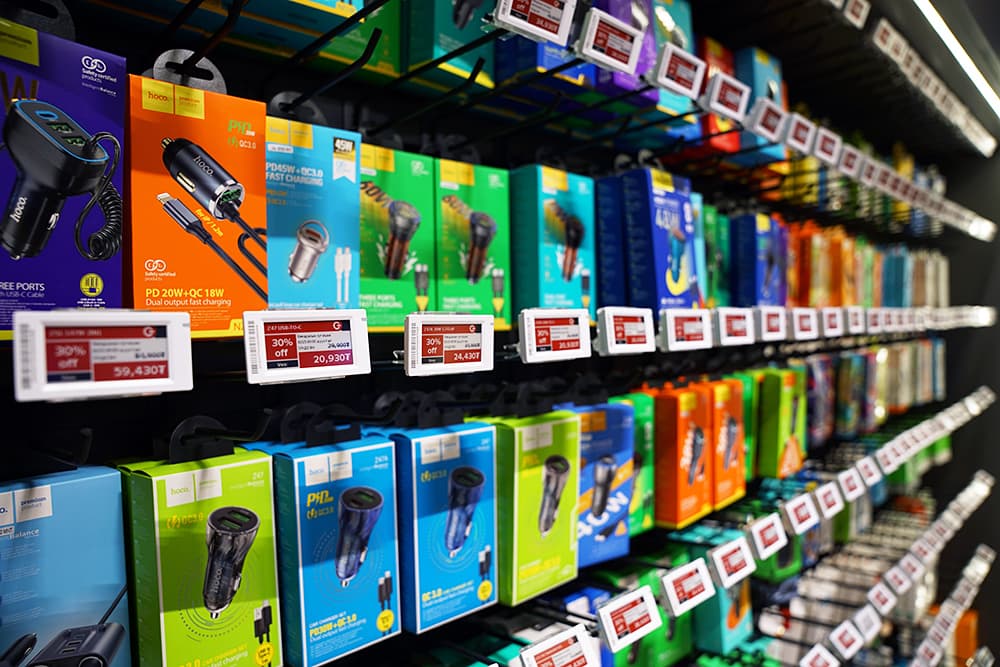
Walk into any modern supermarket, and you'll notice something different on the shelves: crisp, e-paper displays showing prices that update automatically. Electronic Shelf Labels (ESL) have moved from luxury to necessity for grocery retailers competing on price accuracy, labor efficiency, and customer trust.
A typical supermarket with 20,000–30,000 priceable positions changes prices on 500–2,000 items per week during normal operations, and far more during promotional campaigns. With paper labels, that means staff walking the aisles for hours, manually pulling and replacing tags, and hoping no mismatch sneaks through. A single price discrepancy can trigger regulatory fines, customer complaints, and eroded trust.
ESL systems solve this by pushing price changes from your POS or ERP system directly to shelf-edge displays within seconds. No paper, no walking, no mismatch. But the decision isn't just "buy ESL" — it's about choosing the right sizes for each department, understanding battery life implications, and planning your gateway infrastructure for full-store coverage. Get these wrong, and you'll face dead zones, refresh failures, and a budget that spiraled past projections.
This guide walks through every technical decision a supermarket operator needs to make before, during, and after an ESL deployment — with specific numbers, not vague generalities.
For a broader overview of ESL technology across all retail formats, see our Electronic Shelf Labels Buyer Guide. If you're already evaluating hardware, browse our ESL product catalog for specifications and datasheets.
2. ESL Size Guide for Supermarket Departments
The most common mistake supermarket operators make is buying one ESL size for the entire store. Different departments have different information needs, shelf depths, and SKU densities. Here's a department-by-department breakdown using the five standard ESL sizes available on the market.
| ESL Size | Display Area | Best For | Info Capacity | Cost Range |
|---|---|---|---|---|
| 1.54" | 27×27mm | Center store aisles, canned goods, dry grocery | Price, barcode, promo flag | $5–$8/tag |
| 2.13" | 34×48mm | Bakery, dairy, snacks, cosmetics | Price + product name + badge | $6–$10/tag |
| 2.66" | 29×64mm | Fresh produce, deli, meat, seafood | Price + weight + origin + allergens | $8–$12/tag |
| 2.9" | 38×84mm | Promotional endcaps, seasonal zones | Price + image + promo banner | $10–$15/tag |
| 4.2" | 55×95mm | Category headers, endcap signage, service counters | Category info + QR + multi-field display | $12–$20/tag |
Recommended Size Distribution for a Typical Supermarket
Based on deployment data from grocery retailers worldwide, an effective size mix looks like this:
| Department | Size | % of Total Tags | Example SKU Count |
|---|---|---|---|
| Dry grocery & center store | 1.54" | 70% | 14,000–21,000 |
| Fresh (produce, deli, meat) | 2.66" | 15% | 3,000–4,500 |
| Promotional & seasonal | 2.9" | 8% | 1,600–2,400 |
| Bakery, dairy, specialty | 2.13" | 5% | 1,000–1,500 |
| Endcaps & service counters | 4.2" | 2% | 400–600 |
💡 Pro Tip: Start with a pilot in your highest-price-change department (usually fresh produce or meat). This gives you real-world data on refresh frequency, battery drain, and staff adaptation before committing to a full-store rollout.
3. Battery Life: What to Expect and How to Plan
One of the most frequently asked questions is: "How long do ESL batteries last?" The answer depends on three factors: display size, update frequency, and operating temperature.
Battery Life by Size and Update Frequency
| ESL Size | 1 update/day | 3 updates/day | Hourly updates | Battery Type |
|---|---|---|---|---|
| 1.54" | 5–7 years | 3–5 years | 1–2 years | CR2032 (replaceable) |
| 2.13" | 4–6 years | 3–4 years | 1–2 years | CR2032 or CR2450 |
| 2.66" | 3–5 years | 2–3 years | 1–1.5 years | CR2450 or CR2477 |
| 2.9" | 3–4 years | 2–3 years | 1–1.5 years | CR2477 |
| 4.2" | 2–4 years | 1.5–2.5 years | 1 year | CR2477 or AAA pack |
What Affects Battery Drain?
E-paper displays only consume power when changing the screen content. A static price display uses essentially zero energy. The power draws come from:
- Radio communication: The tag wakes up periodically to listen for gateway commands. More frequent wake-ups = more battery drain.
- Screen refresh: Each full screen refresh consumes a burst of energy. Partial refreshes (flashing only changed pixels) are more efficient but not all hardware supports this.
- Temperature extremes: Cold-chain environments (freezer sections at -18°C) reduce battery capacity by 20–30%. Plan for shorter replacement cycles in these zones.
- Signal strength: Tags in weak signal areas retransmit more often, draining batteries faster. This is directly tied to gateway placement quality.
⚠️ Planning Note: Budget for battery replacement as a recurring maintenance cost, not a one-time expense. For a 20,000-tag store with an average 4-year battery life, expect to replace ~5,000 tags' batteries per year. At $1–$2 per battery + 30 seconds of labor per tag, that's $7,500–$15,000/year in maintenance.
4. Gateway Planning: Coverage, Capacity, and Placement
The gateway (also called a base station or access point) is the most critical infrastructure decision in your ESL deployment. Get the gateway count wrong, and you'll face dead zones, slow refreshes, or "zombie tags" that miss updates and enter high-power resync mode — potentially affecting 15% of your network and increasing infrastructure TCO by 40% over five years.
Gateway Capacity: Standard vs. High-Concurrency
| Parameter | Standard Gateway | High-Concurrency Gateway |
|---|---|---|
| Tags per gateway | 500–1,000 | 5,000–10,000+ |
| Recommended planning ratio | 500 tags/gateway | 5,000–7,000 tags/gateway |
| For 20,000 tags | 40 gateways | 3–4 gateways |
| For 30,000 tags | 60 gateways | 5–6 gateways |
| Processing model | Sequential / threaded | Async / event-driven |
| Radio management | Single channel | Multi-channel / frequency hopping (FHSS) |
| Update speed (full store) | Minutes to hours | Near real-time (< 15 sec per aisle) |
Coverage Range and Placement
Gateway coverage is determined by floor area and ceiling height, not by SKU count. Key placement principles:
- Mount within 4–6 meters of the furthest tag. Use ceiling-mounted booms or directional antennas for high-ceiling stores.
- Coverage radius: A typical BLE gateway covers a 15–20 meter radius in open retail space. Metal shelving, freezer units, and concrete columns reduce this by 30–50%.
- Use a honeycomb layout — stagger gateway positions to minimize signal overlap and reduce co-channel interference.
- Plan for 20% future expansion headroom. If you plan for 5,000 tags per gateway today, size for 6,000 capacity to accommodate SKU growth.
- Conduct a pre-deployment RF site survey. Map signal attenuation from metal racks, refrigeration units, and structural columns before finalizing gateway positions.
Practical Gateway Sizing for Supermarket Sizes
| Store Format | Floor Area | SKU Count | Standard Gateways | High-Concurrency Gateways |
|---|---|---|---|---|
| Convenience store | 200–400 m² | 1,000–3,000 | 3–6 | 1 |
| Compact supermarket | 500–1,000 m² | 5,000–10,000 | 10–20 | 2 |
| Standard supermarket | 1,000–3,000 m² | 15,000–25,000 | 30–50 | 3–5 |
| Hypermarket | 3,000–8,000 m² | 30,000–60,000 | 60–120 | 6–12 |
💡 Key Insight: The "gateway density paradox" — installing more gateways doesn't always improve performance. Beyond an optimal density, gateways create self-interference noise that degrades the entire network. Fewer high-concurrency gateways often outperform many standard ones.
5. Wireless Protocol: BLE vs. Zigbee vs. Sub-GHz
Most modern ESL systems use one of three wireless protocols. Here's how they compare for supermarket environments:
| Feature | BLE 5.x | Zigbee | Sub-GHz (433/868 MHz) |
|---|---|---|---|
| Range (open space) | 15–30 m | 10–20 m | 30–100 m |
| Penetration (walls/racks) | Medium | Medium | High |
| Power consumption | Low | Low | Very low |
| Interference with Wi-Fi | Shares 2.4 GHz band | Shares 2.4 GHz band | No interference |
| Max tags per gateway | Up to 10,000+ | Up to 5,000 | Up to 5,000 |
| Industry adoption | Dominant (most vendors) | Common (Hanshow, Pricer) | Niche (specific deployments) |
| Update latency | Seconds | Seconds | Seconds to minutes |
For supermarkets, BLE 5.x is the recommended choice for most deployments because of its wide vendor support, high gateway capacity, and compatibility with existing IT infrastructure. However, if your store has heavy Wi-Fi congestion or thick freezer sections, Sub-GHz offers superior penetration and zero Wi-Fi interference.
Some enterprise-grade gateways support multi-protocol coexistence (BLE + Zigbee + Sub-GHz), allowing you to use different protocols in different store zones without separate gateway infrastructure.
6. Total Cost Breakdown for Supermarket Deployment
ESL is a system, not a product. The per-label price is only one of four budget lines. Here's a realistic breakdown for a standard supermarket deploying 20,000–30,000 tags:
| Cost Component | What It Covers | Estimated Cost | Scaling Factor |
|---|---|---|---|
| Labels (tags) | E-paper displays in various sizes | $120,000–$300,000 | Per tag ($5–$20 avg) |
| Gateways | Base stations / access points | $3,000–$15,000 | Per floor area |
| Software / platform | Management console, API, cloud | $2,000–$10,000/year | Per store / subscription |
| Integration & install | POS/ERP connectors, mounting, training | $15,000–$50,000 | One-time per rollout |
5-Year Total Cost of Ownership
| Cost Line | Year 0 (Upfront) | Years 1–5 (Annual) | 5-Year Total |
|---|---|---|---|
| Labels (20,000 mixed sizes) | $160,000 | $0 (amortized) | $160,000 |
| Gateways (4 high-concurrency) | $8,000 | $400 (maintenance) | $10,000 |
| Software subscription | $5,000 | $5,000 | $30,000 |
| Integration & install | $25,000 | $0 | $25,000 |
| Battery replacements | $0 | $10,000 | $50,000 |
| Network infrastructure (PoE, VLAN) | $3,000 | $300 | $4,500 |
| Total | $201,000 | $20,700 | $279,500 |
What Offsets This Cost?
The ROI calculation isn't just about spending — it's about what you stop spending:
- Labor savings: Eliminating manual price changes saves 15–30 hours/week of staff time. At $15/hour, that's $11,700–$23,400/year per store.
- Paper & printing costs: $2,000–$5,000/year eliminated.
- Price error reduction: A single pricing compliance violation can cost $500–$5,000 in fines. ESL eliminates mismatches.
- Dynamic pricing revenue: Time-sensitive markdowns on perishables (meat, bakery, dairy) can recover 2–5% of shrinkage losses.
Typical payback period: 3–5 years for standard supermarkets, 2–3 years for high-turnover grocery formats.
7. 10-Step Supermarket ESL Deployment Checklist
- Define business objectives — Are you deploying for price accuracy, labor reduction, dynamic pricing, or regulatory compliance? Your primary goal determines size mix and gateway count.
- Audit shelf inventory by department — Count SKUs, measure shelf rail types, photograph current label placements. This determines your size distribution and mounting hardware needs.
- Select label size mix — Use the department-by-department table in Section 2 as a starting point. Adjust based on your specific shelf depths and information requirements.
- Conduct RF site survey — Map signal attenuation from metal shelving, freezer units, structural columns. Identify potential dead zones before ordering gateways.
- Calculate gateway count — Use the store-format table in Section 4. Add 20% headroom for future SKU growth.
- Choose wireless protocol — BLE for most stores. Sub-GHz for stores with heavy freezer sections or Wi-Fi congestion.
- Plan POS/ERP integration — Confirm your POS system has an API or middleware connector for the ESL platform. Test data flow: price change → ESL management console → gateway → tag refresh.
- Design label templates — Create templates per department. Include price (large), unit price, product name, barcode, promo badge, and QR code where applicable.
- Plan mounting hardware — Most ESL tags clip onto standard shelf rails. Verify rail compatibility. For freezer sections, use sealed-housing variants rated for IP67 and sub-zero operation.
- Run a pilot before full rollout — Deploy 200–500 tags in one department (fresh produce recommended). Test daily price updates, promotional changes, and battery behavior for 2–4 weeks before committing to full-store deployment.
8. POS/ERP Integration: Making Price Updates Work
ESL systems don't operate in isolation — they're a display layer for your pricing data. The integration architecture typically follows this flow:
POS/ERP → price update → ESL Management Platform → renders template → Gateway → RF signal → ESL Tag → screen refresh
Integration Options
| Integration Method | How It Works | Best For |
|---|---|---|
| Direct API | ESL platform calls your POS/ERP API on schedule or webhook | Modern cloud POS systems with REST APIs |
| Database polling | ESL platform reads price table from your database at intervals | Legacy POS systems without API |
| Middleware / ESB | Third-party middleware translates between POS and ESL platform | Multi-store chains with complex IT stacks |
| Flat file export | POS exports price file → ESL platform imports and pushes | Simple single-store setups |
Update speed expectation: A well-integrated system updates a single tag within 2–5 seconds of a price change in the POS. A full-store update of 20,000 tags completes in 5–15 minutes with high-concurrency gateways, or 30–90 minutes with standard gateways.
9. Freezer, Cold Chain, and Specialty Environment ESL
Supermarket freezer and chiller sections present unique challenges for ESL deployment:
- Temperature: Standard ESL tags are rated for 0°C to 50°C. Freezer sections operate at -18°C to -25°C. You need sealed-housing variants with extended-temperature batteries (typically CR2477 or AAA lithium packs).
- Condensation: Moving tags between freezer and ambient temperature causes condensation. Sealed IP67-rated housings prevent moisture ingress that would kill the electronics.
- Battery life reduction: Cold temperatures reduce battery capacity by 20–30%. Plan for 2–3 year replacement cycles instead of 5+ years.
- Signal attenuation: Freezer doors with double-paned glass and metal frames attenuate RF signals significantly. Gateways near freezer sections may need signal boosters or dedicated Sub-GHz protocol for better penetration.
- Mounting: Standard shelf clips may not work on freezer rail profiles. Verify compatibility and order freezer-specific mounting adapters.
💡 Cold-Chain Tip: Use "canary tags" — place monitoring tags in the most RF-challenging positions (deep inside walk-in freezers, behind thick structural columns) and monitor their heartbeat and latency. This gives you 24–48 hours of early warning before gateway degradation or interference causes update failures.
10. Top 5 ESL Deployment Mistakes to Avoid
Mistake 1: Buying One Size for the Whole Store
Using 1.54" tags everywhere saves on per-label cost but creates problems in fresh departments where customers need weight-based pricing and origin information. The result: staff end up supplementing ESL with handwritten labels, defeating the purpose.
Mistake 2: Underestimating Gateway Count
Planning gateway count by SKU count instead of floor area leads to coverage gaps. A compact convenience store with 3,000 SKUs may need the same number of gateways as a spread-out store with 10,000 SKUs, because coverage is about physical space, not tag count.
Mistake 3: Skipping the RF Site Survey
Skipping the site survey to save $1,000–$2,000 can lead to $50,000+ in remediation costs when dead zones appear after full deployment. Metal shelving, freezer units, and structural columns create unpredictable attenuation patterns that only a physical survey can reveal.
Mistake 4: Not Planning for Battery Replacement
Treating ESL batteries as "install and forget" creates a maintenance cliff. When 20% of your tags go dark in year 4, you'll face a massive replacement backlog. Plan a rolling replacement schedule from day one — replace 20% of batteries per year, starting in year 3.
Mistake 5: Choosing a Closed (Proprietary) System
Closed ESL systems lock you into one vendor's tags, gateways, and software. When it's time to upgrade or expand, you're forced into a full rip-and-replace. Open systems that support standard protocols (BLE, Zigbee) let you mix and match hardware, reuse existing tags, and switch software platforms without hardware changes.
11. FAQ: ESL for Supermarket
How many ESL tags do I need for my supermarket?
Count your priceable positions (each facing that needs a price label), not your total SKU count. A typical supermarket with 15,000–25,000 SKUs has 20,000–30,000 priceable positions because some products have multiple facings. Conduct a shelf audit to get an accurate count before ordering.
Does ESL work with my existing Wi-Fi network?
Yes — ESL systems use their own wireless protocol (BLE, Zigbee, or Sub-GHz) and do not ride on your Wi-Fi network. Gateways connect to your LAN via Ethernet (PoE), keeping ESL traffic isolated. However, if using BLE (which shares the 2.4 GHz band with Wi-Fi), proper VLAN segmentation is recommended to avoid interference.
How fast can ESL update prices across a full supermarket?
With high-concurrency gateways, a full-store update of 20,000–30,000 tags completes in 5–15 minutes. Individual tag updates take 2–5 seconds from the moment the price changes in your POS system. Standard gateways extend full-store updates to 30–90 minutes.
Can ESL tags survive in freezer sections?
Yes, with the right hardware. Standard ESL tags are rated for 0°C to 50°C. For freezer sections (-18°C to -25°C), use sealed-housing variants rated for IP67 and sub-zero operation. These use extended-temperature batteries (CR2477 or AAA lithium) and have 2–3 year battery life instead of 5+ years.
What's the payback period for ESL in a supermarket?
Typical payback is 3–5 years for standard supermarkets and 2–3 years for high-turnover grocery formats. Labor savings ($12,000–$23,000/year), eliminated paper costs ($2,000–$5,000/year), and reduced pricing compliance violations are the primary ROI drivers. Dynamic pricing on perishables can add 2–5% shrinkage recovery.
Should I choose an open or closed ESL system?
Choose an open system whenever possible. Open systems support standard protocols (BLE, Zigbee) and let you mix hardware from different vendors, reuse existing tags during upgrades, and switch software platforms without replacing hardware. Closed (proprietary) systems create vendor lock-in and often require full rip-and-replace at upgrade time, increasing 5-year TCO significantly.
Planning Your Supermarket ESL Deployment?
SynqNode offers complete ESL solutions — from label sizing consultation to gateway planning, POS integration, and installation support. Get a customized deployment plan for your store.
Request a Free Consultation📚 Related Reading: How to Choose Electronic Shelf Labels: Buyer Guide · Electronic Shelf Label Products · ESL Complete Guide for Retailers · Buyer Guides Hub