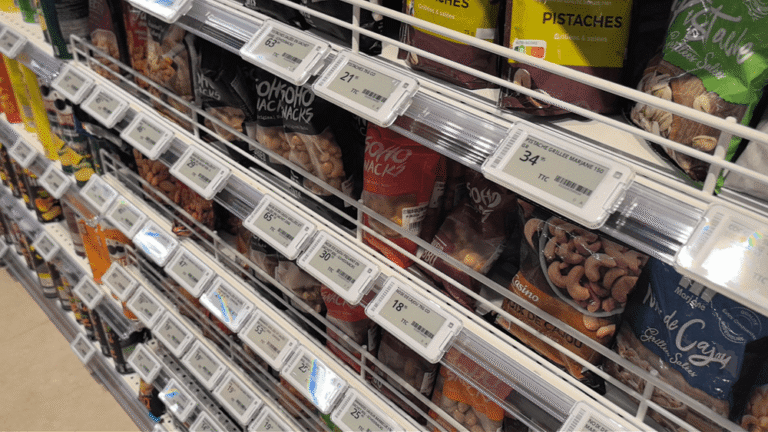
Electronic shelf labels (ESL) are transforming how retailers manage pricing, promotions, and shelf-edge communication. This guide explains how ESL technology works, compares display types and wireless protocols, breaks down real costs and ROI, and gives you a practical deployment roadmap — whether you are a supermarket chain, a system integrator, or a POS software vendor evaluating ESL integration.
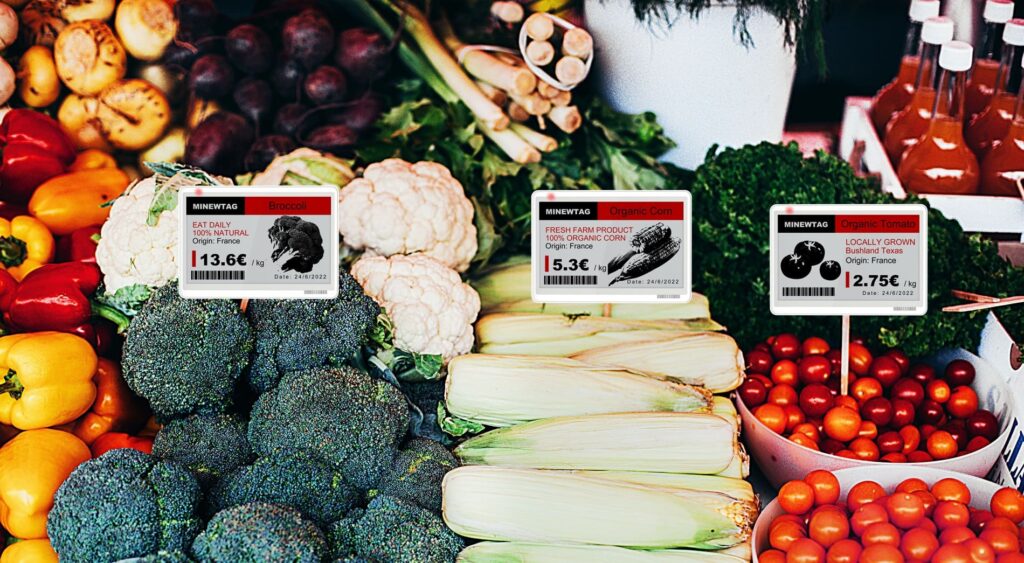
Table of Contents
- What Are Electronic Shelf Labels (ESL)?
- How ESL Systems Work: A Technical Walkthrough
- Why Retailers Are Switching to ESL
- E-Ink Display Types: Choosing the Right Screen
- Label Size Guide: From 1.54" to 7.5"
- Wireless Protocols: 2.4GHz vs BLE vs 433MHz
- System Integration: APIs, SDKs, and Software
- ESL Cost Breakdown (2026)
- ROI Analysis: When Does ESL Pay For Itself?
- Deployment Roadmap: 7-Step Implementation Plan
- How to Choose an ESL Manufacturer
- Future Trends in ESL Technology
- Frequently Asked Questions
What Are Electronic Shelf Labels (ESL)?
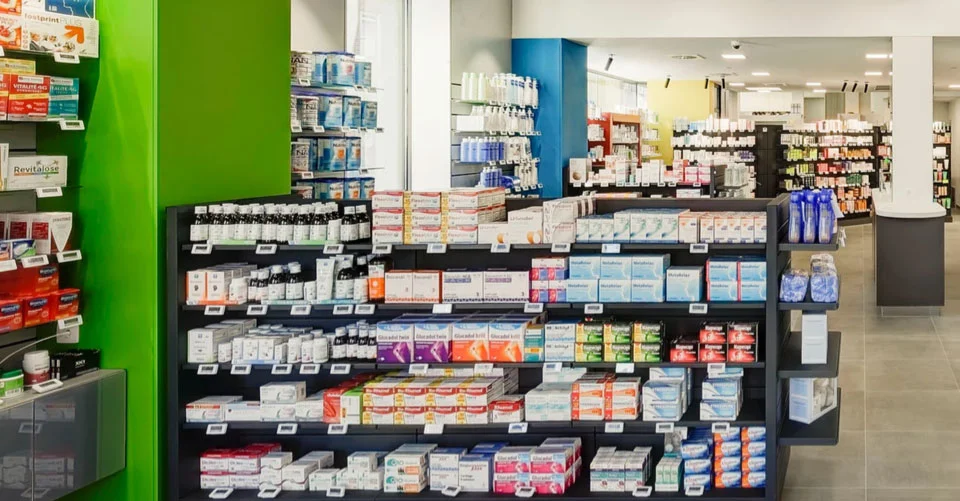
Electronic shelf labels (ESL) — also called digital price tags or electronic shelf tags — are battery-powered e-ink display devices mounted on store shelf edges. They replace traditional paper price tags and update pricing, product information, and promotional content automatically through a wireless network connected to a central pricing management platform.
Each ESL tag uses electronic paper (e-ink) display technology — the same display technology found in e-readers like the Kindle. E-ink displays look like printed paper under store lighting, are readable from wide angles, and consume power only when the screen content changes. Once refreshed, the display holds its image with zero electrical draw. This is why a single coin-cell battery can power one ESL tag for 5 to 10 years.
A complete ESL system consists of three components:
- E-ink labels: The physical tags mounted on shelves, available in sizes from 1.54" to 7.5" and in monochrome, tri-color, and full-color variants
- Wireless gateways: Ceiling-mounted access points that transmit pricing data to labels via 2.4GHz, BLE, or 433MHz protocols — one gateway typically covers 20,000+ labels
- Management software: A cloud-based or on-premise platform that syncs prices from POS/ERP systems, schedules promotions, monitors label battery health, and provides audit logs
Market Growth: The global ESL market was valued at approximately $1.85 billion in 2024 and is projected to reach $7.54 billion by 2033, growing at a CAGR of 17.4% (Grand View Research). Major chains like Walmart are rolling out ESL across all U.S. stores.
How ESL Systems Work: A Technical Walkthrough
Understanding the ESL data flow is essential for system integrators and POS software vendors evaluating integration. Here is the complete end-to-end workflow:
Step 1: Central Pricing Engine
The retailer's POS, ERP, or pricing management system updates a product price. This can be triggered manually by a pricing team, automatically by a dynamic pricing algorithm, or scheduled for a promotional window. The ESL management software receives the updated price through an API integration (REST API or MQTT).
Step 2: Wireless Transmission
The management software sends the update to in-store wireless gateways. These gateways use a dedicated low-power wireless protocol — either 2.4GHz private protocol, Bluetooth Low Energy (BLE), or 433MHz — to communicate with ESL tags. This network is completely separate from the store's Wi-Fi, so price updates never compete with customer traffic for bandwidth.
Step 3: Label Refresh and Confirmation
Each ESL tag wakes from deep sleep mode, receives the updated data packet, refreshes its e-ink display (typically in 3–15 seconds depending on label type and protocol), and sends a confirmation signal back to the gateway. This bidirectional communication provides real-time audit trails — the system knows exactly which labels updated successfully and which did not.
Step 4: Deep Sleep
After the refresh is complete, the label returns to deep sleep mode. The bistable e-ink screen holds the current price image with zero electrical draw. The label remains in this state until the next price update is received — which could be hours, days, or weeks later.
Key Advantage: Because the e-ink display is bistable, the label continues showing the correct price even if the gateway goes offline or the battery eventually dies. The last displayed image persists indefinitely without power — a critical safety feature for retail operations.
Why Retailers Are Switching to ESL
The shift from paper to digital shelf labels is driven by measurable business value across six core areas:
1. Slash Labor Costs on Price Changes
A supermarket with 15,000 SKUs spends 40–60 staff hours per week on manual price tag changes. ESL reduces this to near zero — a single full-store price update takes approximately 5 minutes from the management platform. At $20/hour loaded labor cost, this saves $41,600–$62,400 per store per year.
2. Eliminate Pricing Errors
Manual price tag error rates range from 3–8%. These errors lead to customer complaints, checkout price matches, and in some jurisdictions, regulatory fines for price discrepancies. ESL systems achieve error rates below 0.01%, ensuring shelf prices always match the POS and online store.
3. Enable Dynamic and Competitive Pricing
Paper tags make frequent price changes impractical. ESL enables:
- Time-based pricing (happy hour discounts, lunch specials)
- Competitor price matching in real time
- Automated markdowns on short-dated perishable items
- Multi-store promotional launches executed in minutes, not days
4. Omnichannel Price Consistency
When a customer checks a price online and sees a different price in-store, trust erodes. ESL integrates with your POS and ERP to keep online and in-store prices synchronized automatically. QR codes on labels can link directly to product pages, bridging the physical-digital divide.
5. Sustainability and ESG Goals
A large supermarket chain with 500 stores and 15,000 SKUs per store consumes over 7.5 million paper price tags per pricing cycle. ESL eliminates this waste entirely, supporting corporate sustainability and net-zero targets. The labels themselves last 5–10 years and are fully recyclable.
6. Turn the Shelf Edge Into a Media Channel
Tri-color and full-color ESL tags can display promotional content, brand logos, and QR codes — turning every shelf edge into a digital advertising surface. Some retailers are monetizing this by selling premium shelf-edge placement to brands.
| Metric | Paper Labels | ESL System |
|---|---|---|
| Update time (15K SKUs) | 40–60 hours | ~5 minutes |
| Error rate | 3–8% | <0.01% |
| Annual labor cost per store | $41,600–$62,400 | Near zero |
| Dynamic pricing | Not possible | Real-time |
| Omnichannel sync | Manual, error-prone | Automatic via API |
| Environmental waste | Millions of paper tags | Zero paper waste |
Explore SynqNode Electronic Shelf Labels for ESL hardware engineered for retail deployment.
E-Ink Display Types: Choosing the Right Screen
ESL tags come in several display configurations. Choosing the right type depends on your retail format, pricing complexity, and visual requirements:
| Display Type | Colors | Best For | Cost Level |
|---|---|---|---|
| Monochrome (Black/White) | Black on white | Standard grocery pricing, high-volume SKUs | Lowest |
| Tri-Color | Black / White / Red or Yellow | Promotions, discounts, clearance items | Medium |
| Four-Color | Black / White / Red / Yellow | Complex promotion rules, multi-zone pricing | Medium-High |
| Full-Color (Spectra) | Full color spectrum | Brand displays, premium retail, digital signage | Highest |
| Low-Temperature | Black on white | Freezer and cold storage cabinets (down to -25°C) | Medium |
Recommendation by Retail Format
- Supermarkets / Grocery: Monochrome for standard SKUs; tri-color for promotional aisles
- Electronics Retail: Tri-color or four-color for promotional pricing and spec displays
- Fashion / Premium Retail: Full-color for brand-aligned shelf-edge merchandising
- Convenience Stores: Monochrome — simplicity and cost-efficiency
- Frozen Food / Cold Storage: Low-temperature monochrome rated for -25°C
Label Size Guide: From 1.54" to 7.5"
ESL labels are available in multiple screen sizes, each suited to different product categories and shelf configurations:
| Screen Size | Typical Application | Common Use Case |
|---|---|---|
| 1.54" | Small groceries, cosmetics, spices | Compact items with limited shelf-edge space |
| 2.13" | Supermarket shelves (most popular size) | Standard grocery and retail SKUs |
| 2.66" | Electronics, toys, household goods | Items needing additional product info |
| 2.9" | Department store items, apparel | Medium-sized products with brand display |
| 4.2" | Large products, dual-language pricing | Big-box retail, multi-language markets |
| 7.5" | Pallet tags, warehouse, end-cap displays | Warehouse, bulk retail, promotional end-caps |
Pro Tip: Most retailers deploy a mix of sizes — typically 70% 2.13" for standard shelves, 15% 1.54" for compact items, and 15% larger sizes for promotional and end-cap displays. Plan your label mix during the site survey phase.
Wireless Protocols: 2.4GHz vs BLE vs 433MHz
The wireless protocol your ESL system uses determines update speed, range, gateway density, and infrastructure cost. This is one of the most technical — and most consequential — decisions in ESL deployment.
| Protocol | Range | Labels per Gateway | Best For |
|---|---|---|---|
| 2.4GHz Private Protocol | ~800m line-of-sight | 20,000+ | Supermarkets, large stores, chain retail (mainstream choice) |
| Bluetooth Low Energy (BLE 5.0) | ~400m | 5,000–10,000 | Small-medium stores, smartphone-compatible configurations |
| 433MHz | ~1,000m+ | 20,000+ | Warehouses, big-box stores, interference-heavy environments |
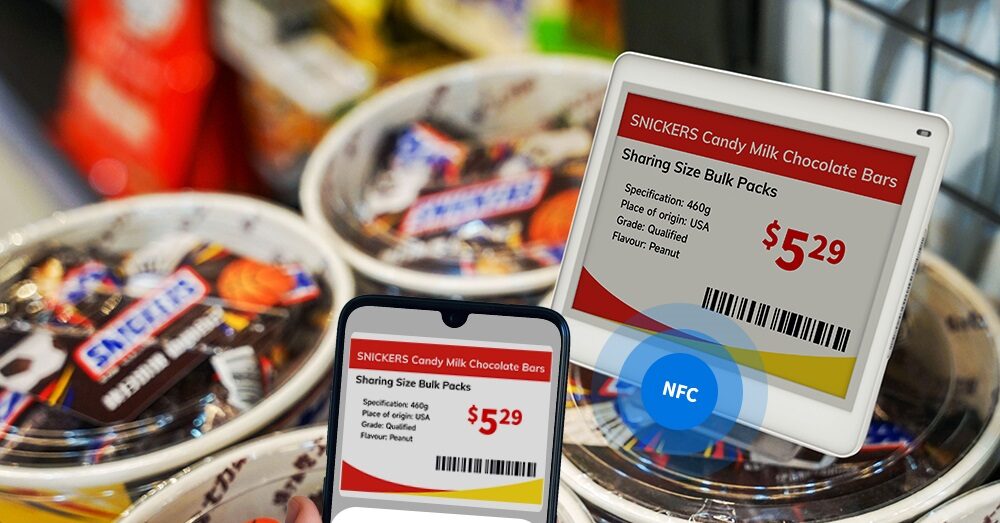
| NFC | Touch range | N/A (no gateway) | Boutiques, price checks, pilot programs |
Which Protocol Should You Choose?
- 2.4GHz is the mainstream choice for supermarkets and chain stores. It offers the best balance of speed, range, and gateway capacity. One gateway covers approximately 500 sqm of retail space.
- BLE 5.0 is ideal for small-to-medium stores or pilot programs. It supports smartphone-based label configuration and requires fewer dedicated access points, but has lower label capacity per gateway.
- 433MHz excels in environments with heavy interference or very large open spaces (warehouses, big-box retail). Its long range and strong wall penetration make it suitable for challenging RF environments.
- NFC is for boutique stores or targeted price checks — no gateway infrastructure required. Simply tap the label with an NFC-enabled smartphone to update.
For System Integrators: Some platforms support mixed-protocol ecosystems — BLE and 2.4GHz labels under a single cloud management platform. This gives you flexibility to optimize gateway density per store format. Download the SynqNode ESL SDK and API documentation for integration details.
System Integration: APIs, SDKs, and Software
For POS software vendors and system integrators, the integration layer is the most critical evaluation point. A closed, proprietary ESL system locks you into a single vendor and limits your ability to build differentiated retail solutions. Here is what to demand from your ESL hardware partner:
REST API for Price Management
The ESL platform should expose a REST API that allows your POS or pricing software to push price updates programmatically. Key API endpoints should include:
- Update single label price
- Bulk update by store, category, or SKU list
- Schedule promotional pricing windows
- Query label status (battery level, last update, signal strength)
- Retrieve audit logs and error reports
MQTT Gateway Integration
For real-time, event-driven architectures, MQTT protocol support enables the ESL gateway to push status events (label offline, low battery, update failed) to your middleware. This is essential for large-scale deployments where real-time monitoring is required.
Template and Layout Management
The management software should support customizable label templates — allowing you to define what appears on each label size: price, unit price, product name, barcode, QR code, promotional text, and brand logo. Templates should be editable without code changes.
POS/ERP Synchronization
The ESL system should integrate with your existing POS and ERP through standard connectors or APIs. Price changes in the ERP should flow automatically to the ESL platform — no manual data entry or CSV exports.
Integration Red Flag: If an ESL vendor does not provide public API documentation, SDKs, or developer support, you are looking at a closed proprietary system. This will limit your ability to integrate with third-party software and create long-term vendor lock-in. Always request API docs before purchasing.
ESL Cost Breakdown (2026)
Understanding the full cost structure of an ESL deployment is essential for budgeting and ROI calculation. Here is a detailed breakdown of all cost components:
| Cost Category | Typical Range | Notes |
|---|---|---|
| Labels (1.54"–2.9") | $5–$10 per label | Most common sizes for grocery and retail |
| Labels (4.2"–7.5") | $12–$50 per label | Larger screens, tri-color and full-color cost more |
| Gateway / Access Point | $100–$300 each | One gateway per ~20,000 labels (~500 sqm coverage) |
| Management Software | Free to $500+ setup | Some manufacturers include the platform; others charge SaaS fees |
| Accessories (rails, clips, stands) | $0.10–$1.00 per position | Mounting hardware for shelf-edge installation |
| Installation Labor | $0.50–$2.00 per label | Includes site survey, rail mounting, label activation |
| Annual Maintenance | 10–15% of hardware cost | Battery replacements (year 5+), firmware updates, support |
Example: Mid-Size Supermarket (3,000 sqm, 15,000 SKUs)
| Item | Quantity | Unit Cost | Subtotal |
|---|---|---|---|
| 2.13" monochrome labels | 12,000 | $6.50 | $78,000 |
| 1.54" labels (small items) | 2,000 | $5.00 | $10,000 |
| 2.9" tri-color labels (promotions) | 1,000 | $12.00 | $12,000 |
| Gateways (2.4GHz) | 8 | $200 | $1,600 |
| Accessories and installation | 15,000 | $1.50 | $22,500 |
| Software setup | 1 | $500 | $500 |
| Total Estimated Investment | ~$124,600 | ||
Note: Actual costs vary based on label mix, order volume, negotiation, and regional labor rates. Contact SynqNode for a project-specific quotation.
ROI Analysis: When Does ESL Pay For Itself?
For the mid-size supermarket example above, let us calculate the return on investment:
| ROI Factor | Annual Value | Calculation Basis |
|---|---|---|
| Labor savings on price changes | $41,600–$62,400 | 40-60 hrs/week × $20/hr × 52 weeks |
| Pricing error reduction | $5,000–$12,000 | Fewer checkout price matches, reduced fines |
| Dynamic pricing revenue lift | $10,000–$25,000 | Promotional pricing agility, competitive matching |
| Reduced paper tag waste | $2,000–$4,000 | Material and printing cost elimination |
| Total Annual Benefit | $58,600–$103,400 | |
| Payback Period | 14–25 months | $124,600 investment ÷ annual benefit range |
ROI Summary: Most mid-to-large retail ESL deployments achieve payback within 12–24 months. Larger stores with higher SKU counts and labor costs see faster returns. Chain-wide deployments benefit from economies of scale on hardware pricing and centralized software management.
Deployment Roadmap: 7-Step Implementation Plan
A successful ESL deployment requires careful planning. Follow this roadmap to minimize risk and maximize ROI:
Step 1: Define Business Objectives
Before evaluating hardware, clarify your primary goals: Is the priority labor savings, pricing accuracy, dynamic pricing capability, omnichannel sync, or sustainability? This determines your label mix, protocol choice, and software requirements.
Step 2: Site Survey and RF Planning
Map your store layout, shelf configurations, and potential RF interference sources (metal shelving, freezer cabinets, thick walls). Determine gateway positions and quantities. Most ESL manufacturers offer free site surveys for bulk orders.
Step 3: Label Selection and Template Design
Choose label sizes and display types per product category. Design label templates — what information appears on each label: price, unit price, product name, barcode, QR code, promotional text. Have your marketing team approve the visual layout.
Step 4: POS/ERP Integration
Connect the ESL management software to your POS and ERP systems via API. Test price update flows: single label, bulk update, scheduled promotion, and emergency rollback. Verify that audit logs capture every change.
Step 5: Pilot Deployment
Deploy ESL in a single store or a single department (500–1,000 labels). Measure: update success rate, battery performance, RF coverage, staff feedback, and customer response. Use the pilot to refine templates and workflows before scaling.
Step 6: Staff Training
Train store staff on the new system — this is typically a 2-hour session. Cover: how to read labels, how to troubleshoot (what to do if a label does not update), how to use the management software for manual overrides, and how to replace batteries when needed.
Step 7: Chain-Wide Rollout
After a successful pilot, roll out to all stores. Standardize label templates, gateway configurations, and software settings across all locations. Establish a central pricing team that manages all stores from a single dashboard.
How to Choose an ESL Manufacturer
Not all ESL suppliers are equal. Distinguishing genuine engineering manufacturers from trading companies is critical for long-term deployment success. Evaluate potential partners across these dimensions:
| Evaluation Dimension | What to Ask | Red Flags |
|---|---|---|
| Manufacturing Capability | ISO 9001 certified factory? In-house SMT production lines? Monthly capacity? | No factory tour available; vague capacity claims |
| Protocol Flexibility | Do they support both 2.4GHz and BLE? Can you mix protocols under one platform? | Single-protocol only = lock-in risk |
| Software Maturity | Is the management software cloud-native? Does it support REST API and MQTT? | No API documentation = closed proprietary system |
| Display Range | Do they offer 1.54" to 7.5" sizes? Monochrome, tri-color, and full-color? | Limited size range = may not cover all use cases |
| Battery Life Claims | What is the tested battery life? Can they provide test reports? | "5 years" without test data = unverifiable claim |
| Deployment Record | How many stores deployed? Which retail formats? References available? | No references = first-time manufacturer or trading company |
| OEM/ODM Support | Can they customize label templates, branding, and packaging? | "We can customize" without examples = likely outsourcing |
| Sample Kit Availability | Can you order a sample kit with multiple sizes and a gateway for testing? | No sample program = not confident in their own product |
| Warranty and Support | What is the warranty period? Is technical support available in your time zone? | No warranty terms = no confidence in product quality |
SynqNode ESL Advantage: We manufacture electronic shelf labels with E-ink displays in multiple sizes and color configurations. Our ESL platform provides open REST APIs and SDKs for seamless POS/ERP integration. We support OEM/ODM customization for partners deploying at scale. Become a partner or request a sample kit for testing.
Planning an ESL Deployment?
SynqNode manufactures electronic shelf labels, gateways, and management software for retail chains, system integrators, and POS software vendors. Open REST APIs. OEM/ODM customization. Sample kits available.Request ESL Consultation
Future Trends in ESL Technology
The ESL market is evolving rapidly. Here are the key trends shaping the next 3–5 years:
1. AI-Driven Dynamic Pricing Integration
ESL platforms are integrating with AI pricing engines that analyze demand patterns, competitor prices, inventory levels, and weather data to optimize prices in real time. The ESL hardware becomes the execution layer for algorithmic pricing strategies.
2. Full-Color E-Ink Adoption
Full-color e-ink displays (Spectra 6 technology) are becoming commercially viable for premium retail. This enables brand-aligned shelf-edge merchandising and digital advertising at the point of purchase — previously impossible with monochrome ESL.
3. ESL as Retail IoT Infrastructure
Modern ESL gateways are evolving into multi-purpose IoT hubs — connecting not just labels, but also environmental sensors (temperature, humidity), people counters, and electronic shelf cameras for planogram compliance. The gateway becomes the store's edge computing node.
4. Cloud-Native ESL Management
The shift from on-premise software to cloud-native platforms enables centralized management of thousands of stores from a single dashboard, with real-time analytics, automated alerts, and machine learning-powered optimization.
5. Analytics and Shopper Behavior Data
Some next-generation ESL tags include motion sensors and NFC engagement tracking — providing data on how customers interact with shelf-edge content. This turns the shelf edge into a data collection point for retail analytics.
Frequently Asked Questions
How long do electronic shelf labels last?
Standard ESL labels operate for 5–10 years on a single coin-cell battery. The e-ink display itself lasts longer than the battery. Actual battery life depends on update frequency, display size, and operating temperature. The management software monitors battery levels and alerts staff before replacement is needed.
Do electronic shelf labels need Wi-Fi?
No. ESL tags communicate with gateways using a dedicated low-power wireless protocol (2.4GHz, BLE, or 433MHz) that is completely separate from the store's Wi-Fi network. This ensures price updates never compete with customer Wi-Fi traffic and are not affected by network congestion.
Can ESL labels work in freezers and cold storage?
Yes. Low-temperature ESL models are specifically designed for freezer cabinets and cold storage environments, rated for operation down to -25°C. Standard labels may not perform reliably in freezing conditions, so always specify low-temperature variants for frozen food sections.
What happens when the battery dies?
The e-ink display is bistable — it holds the last displayed image indefinitely without power. The correct price continues to show on the shelf even after the battery dies. The management software flags low-battery labels for proactive replacement, so staff can swap batteries before any issue occurs.
How much does an ESL system cost?
For a mid-size supermarket (3,000 sqm, 15,000 SKUs), the total investment is approximately $80,000–$200,000 depending on label mix, display types, and infrastructure requirements. Most deployments achieve ROI within 12–24 months through labor savings, error reduction, and dynamic pricing revenue. Request a project-specific quotation for accurate pricing.
Can I integrate ESL with my existing POS or ERP system?
Yes — if the ESL manufacturer provides open APIs. Look for a platform with REST API and MQTT support, documented SDKs, and proven POS/ERP integration references. Closed proprietary systems without API access will require manual price entry and should be avoided. Download SynqNode SDKs and API documentation for integration details.
How long does it take to install ESL in a store?
For a mid-size supermarket, installation typically takes 2–4 days: 1 day for site survey and gateway installation, 2–3 days for rail mounting and label activation. The process includes staff training (approximately 2 hours). Chain-wide rollouts follow a standardized template after the first pilot store is completed.
Can a small store afford an ESL system?
Yes. A small store can start with a few hundred labels and one gateway at $5–$10 per label. Many manufacturers offer sample kits or starter bundles for pilot testing. The ROI for small stores is driven primarily by labor savings and pricing accuracy, with payback typically in 18–30 months.
Electronic Shelf LabelsESLE-InkDigital Price TagsRetail TechnologyDynamic PricingSmart Retail
Looking for more retail hardware insights? Explore our Supermarket & Grocery Solutions, browse our ESL Product Portfolio, or become a partner for OEM/ODM manufacturing support.
About SynqNode: We are a B2B retail hardware manufacturer engineering POS terminals, electronic shelf labels, self-service kiosks, industrial Mini PCs, and peripheral devices for POS software vendors, system integrators, retail chains, and distributors worldwide.